| HWiNFO32 was briefly mentioned in the How To Update Hardware Drivers In Windows guide as a tool to identify hardware and devices. The program can display comprehensive hardware information and realtime system health information. It is a portable application which means that it can be started from an external device without installation. Users who prefer to install the application can download an installer instead from the developer website. A beta version that includes the latest features and hardware support is available on that site as well. HWiNFO32 displays a system summary window and its main user interface on startup. The system summary displays realtime system information, from the processor and video card clock to supported cpu features and motherboard interfaces.  Information that you can grab from the screen include the cpu, video card, computer memory and motherboard model and specification. This can for instance be handy to see if there are firmware updates for the bios version, or driver updates for the graphic card. While it is not possible to search for those from within the application, it makes it easier to find the right driver information online as you can make a detailed search for those updates. The main application window lists hardware groups on the left, and detailed information about devices in that group on the right. The level of detail exceeds that of the Windows Device Manager and the Bios device listing.  Here is a short list of useful hardware information displayed by the program:
The program has a report option which can be used to save a detailed hardware report in various formats to the local PC. Reports can be saved as text, xml or HTML files among other options. A click on Sensors displays sensor information, including thermal sensor readings. You see the cpu, pch, motherboard, video card and hard drive temperatures, fan speeds and core voltage information. The program keeps track of max and min values for as long as it is running in the background. Handy to assess the temperature levels or voltages over time, for instance to see if crashes or lock-ups are caused by critical temperature levels.  Alerts and notifications can be configured if values reach critical levels. The program supports a wide variety of options in this regard, from playing a sound and running a program to displaying information on Logitech LCD keyboards or a sidebar gadget.  HWiNFO32 comes with a benchmarking tool to benchmark the cpu, memory and disk. It is recommended to disable all running applications before the benchmark is started for clearer results. The developers have included an automatic update check in the application to keep the program up to date automatically. This is completely optional but handy if installed hardware is not recognized correctly or fully supported by the hardware information tool. HWiNFO32 is packed to the brim with hardware and device related information. That, and the fact that it can be used as a portable application should be reason enough to include on a CD or USB stick full of system repair, maintenance and analysis tools. Is there anything missing? Well, the application missed the cpu fan on our Windows 7 test system, but that was the only thing missing. |
Sunday, May 1, 2011
HWiNFO32, Computer Hardware Information Software


How To Scan Your Music Library For Missing Songs
| If you are a music connoisseur, you may take pride in a complete music library without missing songs or meta tags. But how do you make sure that no songs are missing in your library? That every album is complete? Tools to scan a library of songs for missing tracks are rare. One application that can be used for the job is Jaikoz Audio Tagger. The program is not free, but the trial version is sufficient to run through your whole music library to find out if songs are missing in it. You first need to download and install the application which is available for Microsoft Windows, Apple Macintosh and Linux.  A remark about the trial version. It is limited in functionality, but that is not a problem, as we are not using the software to write data to individual songs. We only use the software to find missing tracks in a local music collection, and that feature does not appear to be limited. You can save the missing song information to your computer, which you can then use as a reference to download or obtain the missing songs. The first step after installation is to load the music library into the program. This is done with a click on File > Open Folder. Just pick the root folder of your collection to add it to the software. Jaikoz scans all folders and files under that structure automatically, and information about the identified music appears in the program interface afterwards. Select Action > Auto Correct, or press Ctrl-1 on the keyboard after this first step. This will look up all songs and albums at the online music database MusicBrainz. This look up can take quite some time, depending on the number of songs and files stored under the root folder. Use Reports > List Missing Songs For Albums in the final step to run a scan for missing songs. All albums that have been identified in the second step will be scanned for missing songs. This is done by comparing the information from the MusicBranz music database with the existing tracks on the computer. A report is generated and displayed in a popup window. Here you find information about the albums, artists and song titles that are missing.  The report is available as a HTML or CSV version, which can be both saved to the local directory. With those information at hand, it is now possible to obtain the missing songs to complete the music library on your computer. Jaikoz is a handy tool for that task. Are you using a different tool or service to scan your music collection for missing songs? Let me know in the comments. |
Interview: Billy Corgan talks Smashing Pumpkins reissues, new studio album
 Billy Corgan, on stage with The Smashing Pumpkins, in Louisville, Kentucky, 2010. © Cooper Neill ./Retna Ltd./Corbis "I'm happy to be in The Smashing Pumpkins," says Billy Corgan, who does indeed sound like a man who's reveling in a much-longed-for period of contentment. "I'm happy to be playing with the people I'm playing with. Obviously, I'm not looking back in my current musical life. I'm happy to do the reissues, and I'm glad to have had the opportunity to craft this new deal with EMI to release a lot of material. "But my whole life is invested in what I'm doing right now," he continues. "I think there's a nice balance that can be achieved between the past, the present and the future. But for me, it always starts with the future. The Pumpkins have always been about trying to push forward." For Corgan and the rest of The Smashing Pumpkins (drummer Mike Byrne, bassist Nicole Fiorentino and guitarist Jeff Schroeder) that balance of the past, present and future will be revealed in some fascinating and exciting ways in the coming years. Next week, they'll release the glistening new track Owata, the latest installment of their 44-song opus, Teargarden By Kaleidyscope. In an interesting turn, however, that sprawling mega-work is taking on a new shape. There will be an 'album within an album,' a complete disc to be called Oceania, part of Teargarden but to be issued separately under the terms of the deal that Corgan just inked with EMI. It's an arrangement the maverick musician is stoked about, giving the Pumpkins rights to all unreleased materials and allowing them to release, in Corgan's words, "whatever we want, when we want it." And there's more: Over the next three years, the band's back catalogue will be reissued, with each set remastered and packed with bonuses. The initial batch will come this fall, when the group's first two albums, Gish and Siamese Dream, along with their 1994 compilation set, Pisces Iscariot, hits stores. Then, in 2012, the Pumpkins' double album Mellon Collie And The Infinite Sadness, the five-CD rarities package The Aeroplane Flies High, and 1998's Adore, will be released. Finally, in 2013, 2000's Machina/The Machines Of God and Machina II: The Friends And Enemies Of Modern Music will come out as one complete set, along with a greatest hits disc. MusicRadar sat down with Corgan this past week to discuss the first wave of reissues, the new song Owata, and the frontman's plans to revisit (for now at least) the long-form album format. In addition, we talked about the state of the union in Smashing Pumpkins land and how Corgan is feeling in 2011: upbeat, liberated and more motivated than ever to create. With the opening trio of reissues, Gish, Siamese Dream and Pisces Iscariot, is there anything you want to alter dramatically as far as remastering? "No, I just think we're in an era where the dominant music format is no longer the compact disc. Now, it's compressed MP4s or whatever, so I think we have to take into account the mediums and the ways that people are listening to music, which is on iPods and headphones. I know I listen to a lot of music on my laptop, through those little shit speakers. "I guess you have to balance what is a clear take without subverting the recordings to the point where they don't sound right. Sometimes I hear '60s stuff, which was obviously not meant to be bright, and it just sounds really weird. I heard a remastered version of Time Is On My Side by The Rolling Stones, and the tambourine was just crankin' loud. [laughs] I'd never heard it that loud before. So, I'm sensitive to the original intention. "In our case, it's been 20 years since the albums have been released, and they're due for a fresh look with new technology. You know, when we did those albums they were mastered to 16-bit. I think when we go to a much higher digital bit-rate, people will be really surprised at how good those master tapes sound. Basically, I just want to update the fidelity that's there already. That's the best way to put it." {PAGEBREAK} You Tweeted recently as having discovered a first-ever live performance of Starla. The studio version on Pisces Iscariot features a shredtastic, extended guitar solo. Does this live tape take it ever further? "Mmm…I don't think so. [laughs] I'd love to report something amazing. The thing about that gig was, we played an acoustic show at the Cabaret Metro in Chicago in 1992. It was supposed to be in this upstairs room called the Little Theatre, but the night before we played, there was a fire. So we wound up playing on the floor, not the stage, of the main part of the club, kind of in the corner. It was a very strange gig. I thought the tape of the show had only one channel on it, without the stereo picture on it. But the tape I found is full stereo. So the first live version of Starla is on that." And it's an acoustic version? "You know, it's a funny thing. It was an acoustic event, but I think we played it electric. I only listened to a minute of it to check the fidelity – I didn't even know what it was going to be until I started listening to it. There's, like, 10,000 of those in our archives. It's crazy how much stuff we have. "But it's cool to be able to put something like that out if I want to, and that's one of the reasons I'm really excited about this new deal with EMI. If I want to put that track out, I can just put it out. So it's going to be really awesome in the sense that there are no limitations to how much we can release. Plus, I'm in charge of the pricing. "Obviously, fidelity is very important to people's perceptions, so if I don't think something's up to snuff sonically, or if I think something is more of a document, like, 'Hey, you wanna check this out? It's pretty cool, it's not amazing, but it's good,' I can do that and be reasonable with the pricing." You also mentioned that you unearthed a version of Sweet Home Alabama that the band had cut during the Siamese Dream sessions. The Pumpkins doing Skynyrd…kind of surprising. "Yeah. That's one of those weird things that I just vaguely remember. Butch Vig sent us out into the tracking room and said, 'Play something while I get some tones.' So there's this hour-plus DAT of us just fucking off, and during the middle of us fucking off, which really doesn't go anywhere, suddenly we're playing Sweet Home Alabama. Don't ask me why. "I didn't know the lyrics. Obviously, we were just joking around. But that's the kind of thing we can put up on Facebook. A bit too much has been made of the track. Really, it was just us fucking off – we didn't even know how the song went. It was kind of a rough homage. But because of the deal we have with EMI, even if I wanted to put it out on Facebook for a laugh, I could. We don't have to go through all of these channels, other than paying Lynyrd Skynyrd a publishing rate. "That's the really exciting thing about this new deal: there are no limitations to what we can do. I can only think of a few bands in the world that have the ability to access anything that's theirs and do with it what they want." {PAGEBREAK} Video: Corgan writing the song Lightning Strikes Will Teargarden By Kaleidyscope be distributed by EMI? "No, no. Teargarden's not part of the deal. But we're allowed to put Teargarden, in essence, in combination with that stuff. It's hard to explain, but if we wanted to do our own unique marketing and use the EMI stuff and include the Teargarden stuff as part of that, we can." Is it too early to talk about some of the bonus material that we can expect on any of the reissues? "Yeah, only because there's so much material to go through. It's mind-boggling. I was just in Chicago, and there were 700 cassettes all with material on them. Four-tracks, eight-tracks, board tapes…and there's 4,000 DATs. We have 41,000 pieces of things in our archive. We hired a professional archivist to go have a look at it all, and he said he'd never seen anything like it. "I've been sort of a completist from the very beginning. In fact, I found a tape of me and James Iha at the very beginning of the band, and we're sitting in my bedroom recording my songs. It's like we were doing a mini bedroom concert. Why I was documenting to that level, I don't know. The nice thing, though, is that we can add it to this deal. "What's going to go on Gish...it's hard to say. We have to locate masters; some things have to remixed, while others have never been properly mixed. It's going to take a while." Let me ask you about some of your new material. You've already released Lightning Strikes, and next week you're putting out Owata. But because you're now going to start recording a full album, Oceania, am I to assume that the next four-song EP is on hold? "Yeah, we're not going to release anything after Owata until after we put out Oceania – the album within an album. We felt good about the EP format for a while, but it's only taken us so far. I think it's time to refocus everybody on what we're trying to accomplish here by making a full album." What made you reverse your feelings about making albums? Do you still feel, as you've said, that they're a 'dead' medium? "I still stand by my view that I don't think albums are particularly relevant at this time. That may change. But as far as making music… Nobody I know listen to albums anymore. Nobody. I don't care if they're 20 or 55. But for me, from a writing point of view, it's really going to focus me to put a group of songs together that are supposed to go together."  Corgan says co-guitarist Jeff Schroeder (pictured right) has "impeccable integrity." © Tim Mosenfelder/Corbis "It's been a while, so I'm looking forward to making one cohesive statement, the idea that you can say something bigger with a group of songs. And if it pushes me harder to write better music, and people only end up listening to the three best songs, I can live with that. In the past that would have really pissed me off. "The one-song-at-a-time thing has, in many ways, turned this into a singles format. It puts so much pressure on the one song we're releasing, and people then read more into it than they should. For instance, why would we release, say, a cool B-side when we're going to get 50,000 people on Twitter saying, 'This song sucks!'? Maybe they don't get the joke of why we put it out. So I'm really looking forward to getting into some deeper material, and maybe the seventh-best song on Oceania, if it was put up by itself on the internet, it might not get the proper look that it could when it's grouped in with other songs." Speaking of separate songs, next week you're putting out Owata, which is absolutely gorgeous. "Thank you." I'm curious about one lyric, however: "California, look what you've done to me/ Oh Chicago, I'm coming home to you." [Corgan laughs] What's going on there, Billy? "My life is really more in California now at this point, but there's something about coming home that's really important to me, even if it's just symbolically. California's been really good for me. I've had more positive experiences in California during the last five years than I've had at home. Home just doesn't seem like home to me anymore, in many ways. California feels more like home, but Chicago's where I feel the most myself. California's the land of dreams. You can come here and be anyone you want. [laughs] Actually, in the beginning I thought about reversing the line, but this way felt right to me." You're pretty thrilled with the The Smashing Pumpkins these days. Everything's working out? Everybody's getting along? "Our communication is fantastic. They've been incredibly supportive, and everybody is very excited to get in and make this record. If I can try to explain to people where I'm at...I'm at a point in my life where I couldn't be in the situations I used to be in where I didn't have the full support of the group. I have enough confidence in myself where I don't need a band. So if I'm going to have a band, I want it to be a positive experience. I don't want it to be this negative thing where people are fighting over dumb shit. My first 20 years in music was all about that. "I was doing a lot of the work in isolation, and then I'd have to go out into another room and fight with somebody about the fucking deli tray. I'm at a place in my life where I really enjoy being in a band, and I really like the people I'm playing with. At the end of the day, we'll be judged as a group whether we get it done, and I think Oceania will be a really big statement to prove whether or not we belong. I know a lot of people don't think we belong." {PAGEBREAK}  Corgan calls bassist Nicole Fiorentino "an incredibly intuitive musician." © Sayre Berman/Corbis Why do you say that? "Because you get into this concept of what is legitimate and what isn't legitimate. Like, is it legitimate for me to play my music? Well, nobody would argue with that, generally speaking. But is it legitimate for me to play my music under the name 'The Smashing Pumpkins'? I know a lot of people don't feel that way. But I don't see anybody from the old band beating down my door to get back in. [laughs] "Now, the jerk on Twitter might say, 'That's because you're an asshole.' Well, I might be an asshole and I might be a good guy, but it's predominantly my music. So whatever happened happened because I was writing those songs. It wouldn't have happened if I didn't write those songs." Let's talk about the current members. Since she was last to join, what's it like working with Nicole? "I really love playing with Nicole. And even people who might have doubted Mike Byrne, he just won Modern Drummer's Up And Coming Drummer poll. That's pretty significant. I took a real chance on a 19-year-old man who had never been in a recording studio. It's amazing to me how critical people can be of somebody. He's just a kid, and look at what he's doing! I'd say he's handling everything beautifully." I'm sure you've taught Mike and the rest of the band a lot, but what have they shown you? How have they changed you during the past year or so? "Well, I'll tell you the things I like best about them. Jeff, beyond being an incredibly skilled guitar player, has impeccable integrity. Most of my conversations with Jeff revolve around the idea of 'what is the right thing to do?' It always comes down to the same thing: if it doesn't serve the music, let's not do it. It's so nice for me to be in a band with somebody like that. "Nicole, at her core, is really something of an avant-garde musician. She sees the bass in a very particular way. Most musicians, if I try to get into their heads, I can probably imitate them. Nicole I can't imitate. I can't get inside why she picks the notes she does, but almost, without exception, I like 99 percent of what she plays. She doesn't even know scales! But it doesn't matter because she's an incredibly intuitive musician. "And Mike also has impeccable integrity about music. He's such a total musician; he loves it. I mean, he's playing in front of 20,000 people, and he's totally into it. He's not deer-in-the-headlights. [laughs] And he doesn't have the ego problem that some of the other people I've played with had - you know, like, 'Is this my crowd?' Mike's excited that there's 20,000 people to see us play." Has this trouble-free lineup made it easier for you to create? "Um…no. [We both laugh] But it makes me more motivated to create. For people who think that the old band worked because of the tension, I would say there might have been moments where it did, but ultimately it took away more than it gave." {PAGEBREAK}  According to Corgan, drummer Mike Byrne (pictured left) is "handling everything beautifully." © Tim Mosenfelder/Corbis "I think the old version of the band never reached its full potential because of the drama. Let's remember, in 1995, the band was flying high, had just made a double album that was sprawling and aggressive…I mean, we went in there, balls-to-the-wall, and made some crazy music. We were pulling it off. We were just cresting on the wave when we imploded. People forget that. We never actually reached the full maximum of our potential. Of course, the heights that we did reach look very lofty in hindsight, and people think that's as far as we could have gone. We would've gone way further if some people would've just gone to fucking rehab. "At least now I feel supported. It's great to feel supported by the band. I'm comfortable to do what I do with the people around me. I don't have to feel that there's some kind of subterfuge working against me." What gets you up in the morning? Is it that feeling that you still have yet to write your best song? "I don't think like that anymore. I think it's more about trying to portray accurately where you are. It's taken me a while, I think, maybe 10 years, to work through my negative feelings about the music business to where it wasn't having a direct influence on the kind of music I was making and the decisions I was making, which in hindsight were counterintuitive to being successful. "It's like the kid who stands on the street and watches the game, but he doesn't want to join the game. That's how I was for about 10 years. I felt like I should be in the game, but I didn't like the game that was being played. I felt stuck, like I couldn't join in, but I couldn't go inside the house and say, 'Fuck you all.' "I like being an independent artist now, working with the people I'm working with, and making my own decisions based on my own criteria and not some weird cultural version of integrity and authenticity, which is total bullshit. I think I want to be in the game again because I'm playing by my own rules. And I think that's when rock 'n' roll is at its best anyway."  |
View article...
Windows 8 cloud roaming options via Windows Live revealed
Not long ago we just posted that Windows 8 will be having cloud-syncing capabilities, and today thanks to a user on MyDigitalLife Forums, who managed to get themselves a copy of the latest Windows 8 M3 Build 7955 leak, posted a screenshot showing the user account roaming options available in the operating system: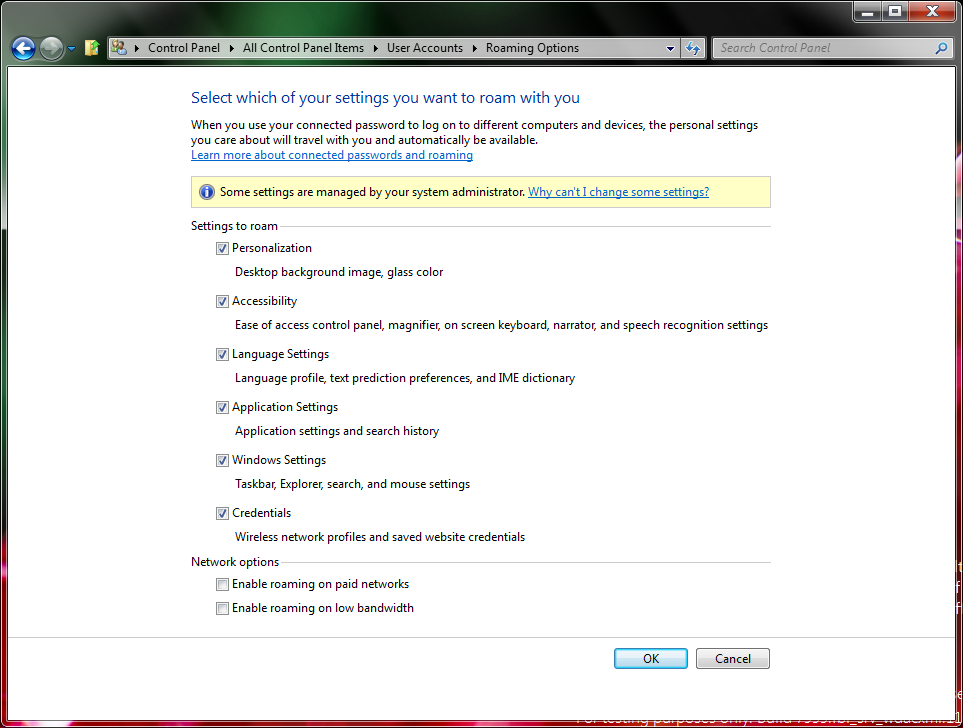 From the screenshot you can clearly see that roaming options includes the following settings:
Of interest is that the description notes that Windows 8 allow roaming of settings between different "computers and devices" – in this case devices might include the upcoming Windows 8 tablets, or perhaps even Windows Phones? All of the above settings will presumably be synced only if you have linked your Windows Live ID to Windows 8. As such, this feature seems to be a natural progression of the settings syncing capabilities found in the current Windows Live Mesh. With recent leaks indicating that files and folders may be roamed as well, it’s not surprising that we may find more details showing some of the other Windows Live Mesh capabilities. Perhaps Ray Ozzie’s initial idea three years ago is finally coming to fruition. Thanks Long Zheng from iStartedSomething.com for the heads up.  |
View article...


Depleted Uranium Could Be Used to Create MASSIVE Hard Drives
 Uranium that's been depleted isn't necessarily waste, according to researchers at Nottingham University. They think—besides making ammo and tank armor—it could be used as the basis for future hard drives thousands of times larger than current ones. More »   |
View article...
Android is now most wanted smartphone OS in U.S.
 Android is now most wanted smartphone OS in U.S., says Nielsen. Android is now most wanted smartphone OS in U.S., says Nielsen.In the period of July to September 2010, consumers looking for a new smartphone overwhelmingly wanted iOS, with 33 percent saying they would get an iPhone. 26 percent wanted an Android and 13 percent wanted a BlackBerry. That has changed, however. For the period of January to March 2011, 31 percent would-be buyers said they wanted an Android phone, compared to 30 percent for iOS and only 11 percent for BlackBerry. The remaining were unsure or wanted Windows. Many of those surveyed were already Android phone owners and it was now their preferred OS. By market share, Android is leading the way at 37 percent followed by iOS at 27 percent and BlackBerry at 22 percent.  Permalink | Comments |
Exclusive production article looking at Roger Waters - The Wall Live
Click here to download the 4.5MB PDF file (http://www.scribd.com/doc/54141808/R...o1koj9du4rb4ke), but for those who don't yet want to know details of the visuals from the concert, be warned it is full of show spoilers from beginning to end! DISCLAIMER: Please notice that the article above is syndicated from Brain Damage and was originally published on 04-29-2011 01:46 PM. As such, APFFN is not responsible for its content. Read the original article here. |
View article...
New Rush audio oddities/rarities from MitA
| It's been a long time but MusicInTheAbstract - owner and operator of the MitA's Rush Oddities site - has several new Rush audio nuggets to share with us all along with a couple of pics. You can view/listen by clicking the following links or just use the player below. Thanks MitA!! [He Don't need a Grape, he's a Digital Ape! recovered fadeout, Digital Man] [Spirit of Radio - Soundcheck] ["Live" vocals overdubbed for Exit Stage Left - "FreeWill"] [Alex exercises his 'freewill' and doesn't play] [La Villa Strange Wreck] [Geddy "Limelight" vocals, isolated from the Exit Stage Left session] [Custom mix of 'XXZ - studio version - Geddy bass, isolated] ["MalBass" isolated bass from Malignant Narcissism] [Tom Sawyer - remix of studio version - Geddy bass, isolated] [Geddy speak French] [Ghost of a Chance - recovered fadeout] [Workin' Them Angels - Geddy and Neil only] [partial graphics from "Time Machine" tour] [Early Rush press photo with John Rutsey] [Hemisphere, Book II - performed during PeW tour |
View article...
Subscribe to:
Posts (Atom)
My Blog List
-
-
-
-
-
-
-
-
26 Beautiful Horse Pictures8 years ago
-
-
-
-
-
-
How to Send a Parcel When Timing Matters1 month ago
-





Popular Posts
-
https://www.youtube.com/watch?v=ME-bLr7mGL4&feature=youtube_gdata_player
-
https://www.youtube.com/watch?v=QS29hC5sKzM&feature=youtube_gdata_player
-
Think Floyd - "The Definitive Pink Floyd Experience" live in concert - UK 2014 Tour | All Pink Floyd ... https://www.google.com/ur...
-
Android Antivirus: 6 truths about smartphone malware http://drippler.com/updates/share/android-antivirus-6-truths-about-smartphone-malware V...


